 b312996e17
Main changes from v3.7 release:490565541Fix XData offset in ComparePane7f584aa02Upgrade FIT SDK to 21.171b7429db20Deprecate DiaryWindow49cbe3db0New monthly calendar (#4679)a1008db76Show workout for planned activity in TrainView (#4686)81ba70ee3Overview Bubble tile - fix missing pointsd24afec85Summary Fields - Include relevant metrics only63e2496fdMetric override icon incorrectly displayed in Trends Overview (#4684)6e9a1f930Update Expected PMC (TriScore) as User Chart.91b666709LTM Charts - Fix perspective filterbe0592dd6User Chart - Fix leyends and labels on Pie chart8162d7de2Improve support for CORE sensor (#4668)d55c7ecd7Refactor DataFilter completers4d95f439bTrain Elevation Chart - Avoid flooding debug log2e2374761Allow expanding Manage Named Filters dialog21fe82f3cExclude planned activities from Cloud Service upload list9713b09e8Recognize Mitja Zupanic6cf470b2aManual Activity Wizard - Fix Duration discardedfb6a2cf81Manual Activity Wizard - Use normalized sportf0b9f75b7Laps Editor - range and decimals depend on units97eab8bc3Add Expected PMC (Coggan) sample chartc0e7b9193Add Expected PMC (TriScore) sample chartd4dd12cfbDataFilter - Add planned|expected to lts/sts/sb/rr74e4dd116Add isRun to DataFilter605cbe028Metrics Trends - Plot expected load on the past72961b655Add Planned to DataFilter5e7fdca41Highlight planned activities in navigatorb2e0cf875Update Spanish translation (#4671)38cf95e24New gc-blank.png image (#4669)64536a0eeDataFilter - Add planned|expected options to pmcbd367e607Add planned/expected PMC to R/Python APIs9726e70e7Add planned/expected PMC to Metrics Trends charts56ff6ff73Add planned workouts / activities (#4666)b5fe5a32cNatural sort order for workouts in train mode (#4667)80cbc11a0Aerolab - Fix imperial units in eoffset label30efd9fa7Fix some typos in Xert integration9c6d361daSingle instance of SpecialFields (#4660)e099e89d7Reworked the dialog for manually creating activities (#4656)55f95e594Overview Metric Tile - support for metric overrides (#4649)e5d4ab114Fix Strava upload Train simulations as VirtualRide6764546daCorrect the format of the "Start Date" and "Start Time" in the activities summary text field. (#4648)83797126bCalculating expected load also based on past stress (#4651)9c666ad55Use the right Context for FreeSearch047ab8079Update German translationae6ebd9aaFitRideFile - Avoid duplicated XData series names5c32910afAvoid crash on WPrime computationf22c3796dFix Workout Wizard window title and stylec1bb636dbDiaryWindow::rideSelected - Ignore same activitye10ad628fFitRideFile - Fix regression with native TCORE969f8c22dEnsure Device Type Tile reflects change on edit (#4633)7e3d0a435Upgrade Qt to 6.5.3 for AppVeyor macOS buildsa97cc9aeaRestore colored zones code to QWT curve34db86d14Update macOS plist to v3.7 Fixes #4631 [publish binaries]
GoldenCheetah
About
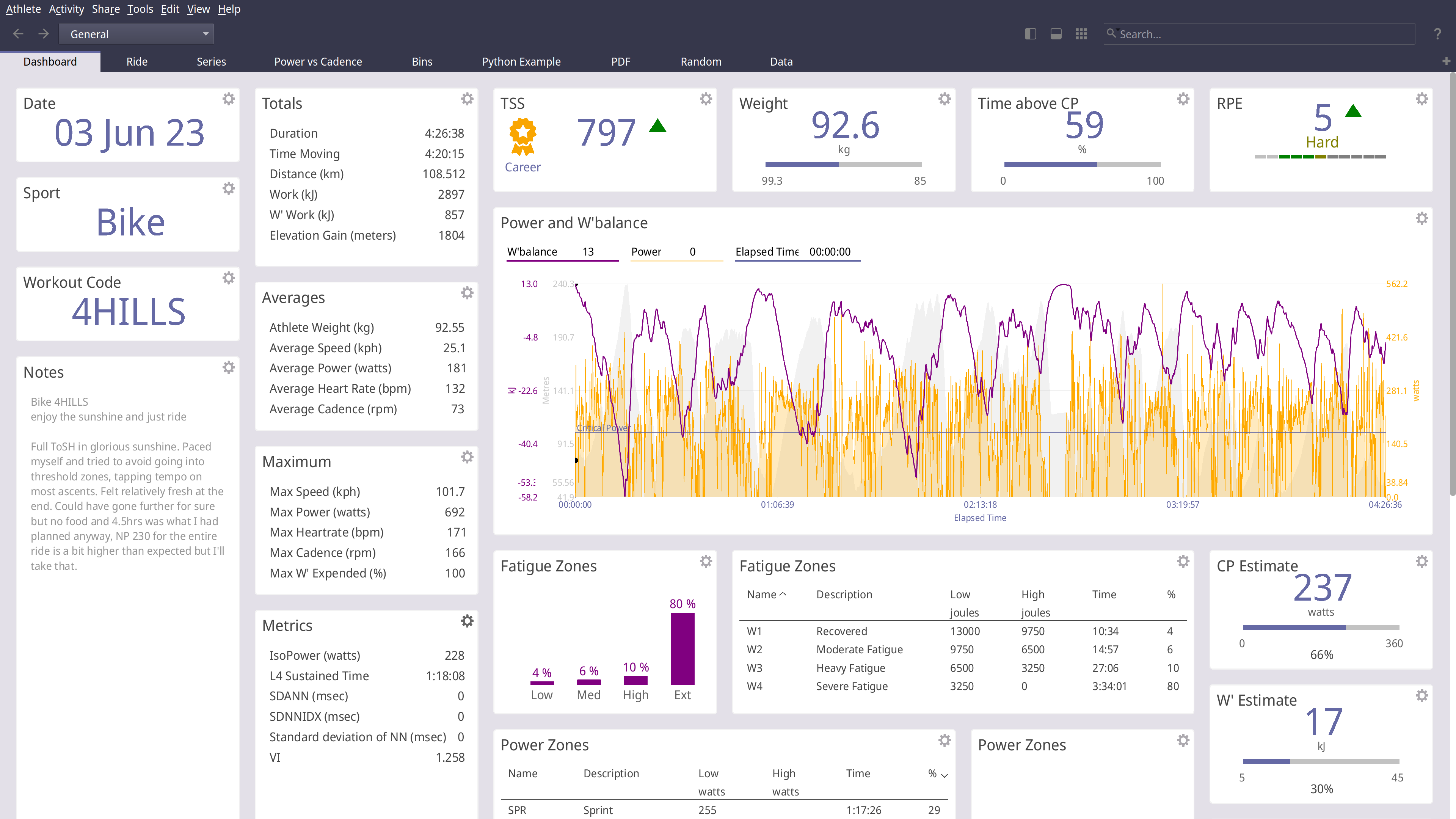
GoldenCheetah is a desktop application for cyclists and triathletes and coaches
- Analyse using summary metrics like BikeStress, TRIMP or RPE
- Extract insight via models like Critical Power and W'bal
- Track and predict performance using models like Banister and PMC
- Optimise aerodynamics using Virtual Elevation
- Train indoors with ANT and BTLE trainers
- Upload and Download with many cloud services including Strava, Withings and Todays Plan
- Import and export data to and from a wide range of bike computers and file formats
- Track body measures, equipment use and setup your own metadata to track
GoldenCheetah provides tools for users to develop their own own metrics, models and charts
- A high-performance and powerful built-in scripting language
- Local Python runtime or embedding a user installed runtime
- Embedded user installed R runtime
GoldenCheetah supports community sharing via the Cloud
- Upload and download user developed metrics
- Upload and download user, Python or R charts
- Import indoor workouts from the ErgDB
- Share anonymised data with researchers via the OpenData initiative
GoldenCheetah is free for everyone to use and modify, released under the GPL v2 open source license with pre-built binaries for Mac, Windows and Linux.
Installing
Golden Cheetah install and build instructions are documented for each platform;
INSTALL-WIN32 For building on Microsoft Windows
INSTALL-LINUX For building on Linux
INSTALL-MAC For building on Apple MacOS
Windows/macOS/Linux on AppVeyor:
Linux on Travis-ci: 
Official release builds, snapshots and development builds are all available from http://www.goldencheetah.org
NOTIO Fork
If you are looking for the NOTIO fork of GoldenCheetah it can be found here: https://github.com/notio-technologies/GCNotio
Feedback
If you have questions or would like to give feedback, we have a Users Forum: https://groups.google.com/g/golden-cheetah-users